AI-Powered Document Comparison: Save Hours of Review
Stop missing critical differences between documents. Our AI technology identifies gaps, inconsistencies, and changes that manual reviews often miss, saving you hours of tedious work.
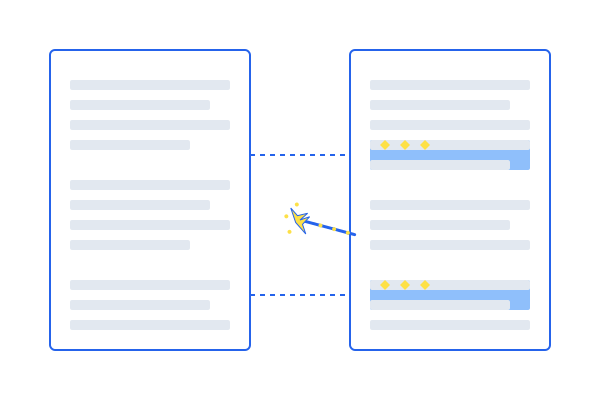
Stop missing critical differences between documents. Our AI technology identifies gaps, inconsistencies, and changes that manual reviews often miss, saving you hours of tedious work.
Choose based on whether you need to compare two complete documents or check approved wording across multiple documents.
Compare two complete documents to identify missing, changed, or different content, especially current versus future state.
See Gap Analysis PreviewCheck whether one common sentence, paragraph, or section is consistent across multiple documents using approved wording as the reference.
See Multi-Document Comparison PreviewOur intelligent document comparison and gap analysis platform adapts to the unique challenges faced by professionals across various sectors.
Ensure documentation meets regulatory requirements by identifying gaps between your documents and standards for compliance and quality assurance.
Compare contract versions, identify discrepancies in legal documents, and ensure consistency across agreements and terms.
Compare research papers, analyze changes between document versions, and identify differences in academic content.
Compare financial documents, identify discrepancies in reports, and ensure consistency in financial documentation.
Compare technical specifications, user manuals, and documentation to ensure consistency and completeness.
Track changes in project requirements, compare document versions, and ensure alignment across project documentation.
See how document upload, AI comparison, gap analysis, and result review fit together before you use your own files.
Enable OCR when your documents are scanned, image-based, or hard to copy text from. DocompareAI can read visible text from scanned PDFs, PNG, JPG, JPEG, and WEBP files, then use the same Gap Analysis and Multi-Document Comparison workflows.
For DOCX, TXT, and searchable PDFs, leave OCR off for the fastest standard extraction path.
These examples use sample document content, so you can inspect the workflow and output format without uploading your own files.
Compares two complete documents to identify missing, changed, or different content.
Future State: New supplier quality requirements
Current State: Existing supplier management SOP
| Requirement | Current State | Gap | Impact |
|---|---|---|---|
| Supplier agreements must define audit rights and change notification timelines. | Quality agreements are mentioned, but audit access and notice timing are not defined. | Yes. Two supplier oversight controls are missing. | High |
| Complaint handling must include recurring trend review. | Complaint investigation is covered, but periodic trend review is not described. | Yes. Trending is only partially covered. | Medium |
| Training records must be retained for seven years. | Training is logged in the LMS, but retention timing is not stated. | Yes. Retention rule is missing. | Low |
Checks whether one common sentence, paragraph, or section is consistent across multiple documents using approved wording as the reference.
Section searched: Intended Use
Text to compare: Target intended use statement from the master file
Aligned. The section includes the same device purpose, user group, and clinical context.
Partial match. The purpose is consistent, but the adult patient population is missing.
Mismatch. The brochure uses broader claims than the approved intended use text.
Automate the tedious process of document comparison, freeing your team to focus on addressing findings rather than identifying them.
Identify subtle gaps and inconsistencies that traditional document comparison tools and manual reviews often miss.
Proactively identify potential issues before they become problems in your documents and processes.
Our AI understands document context, identifying meaningful gaps in content requirements, not just textual differences.
Compare and analyze PDF, DOCX, TXT, scanned PDFs, and OCR-supported image files with intelligent extraction that preserves document structure.
Receive structured reports that prioritize findings based on impact and importance to your specific needs.
Compare documents with a detailed analysis that highlights differences in requirements, procedures, and specifications with contextual understanding.
Identify missing requirements and gaps between your documents and standards with context-aware intelligence.
Ensure consistency across your documentation by comparing specific sections across multiple documents.
Generate detailed reports for review, analysis, and documentation of findings across all your documents.
Your sensitive documents are processed securely and not stored permanently on our servers.
Process large documents and technical files quickly with our optimized comparison engine.
Our streamlined process makes document comparison and gap analysis simple and efficient.
Upload PDF, DOCX, or TXT files, or enable OCR for scanned PDFs and image files.
Choose between gap analysis for two documents or multi-document comparison for broader consistency checks.
Examine the detailed analysis highlighting gaps, inconsistencies, and differences with contextual understanding.
Download comprehensive document comparison reports for your documentation and analysis needs.
If you want to compare two complete documents, choose Gap Analysis. If you want to check one specific sentence, paragraph, or section across multiple documents, choose Multi-Document Comparison.
For Gap Analysis, upload the target or new document as the Future State and your existing document as the Current State.
For Multi-Document Comparison, enter the common section or heading, paste the approved wording that should appear there, and upload the documents you want checked.
Gap Analysis identifies missing, changed, and different content across the two complete documents.
Multi-Document Comparison reports whether the selected wording in each document is aligned, partially matched, or mismatched.
Gap Analysis example: Compare a new regulatory standard with your current SOP to identify requirements the SOP does not yet address.
Multi-Document Comparison example: Check whether the approved “Intended Use” paragraph is consistent across a product IFU, clinical summary, and marketing brochure.
Join professionals across industries who streamline document analysis and gap identification with DocompareAI.
Start Your 5-Day TrialA payment card is required for the trial. You can cancel during the trial period from My Account.